One portfolio tracker for crypto and stocks
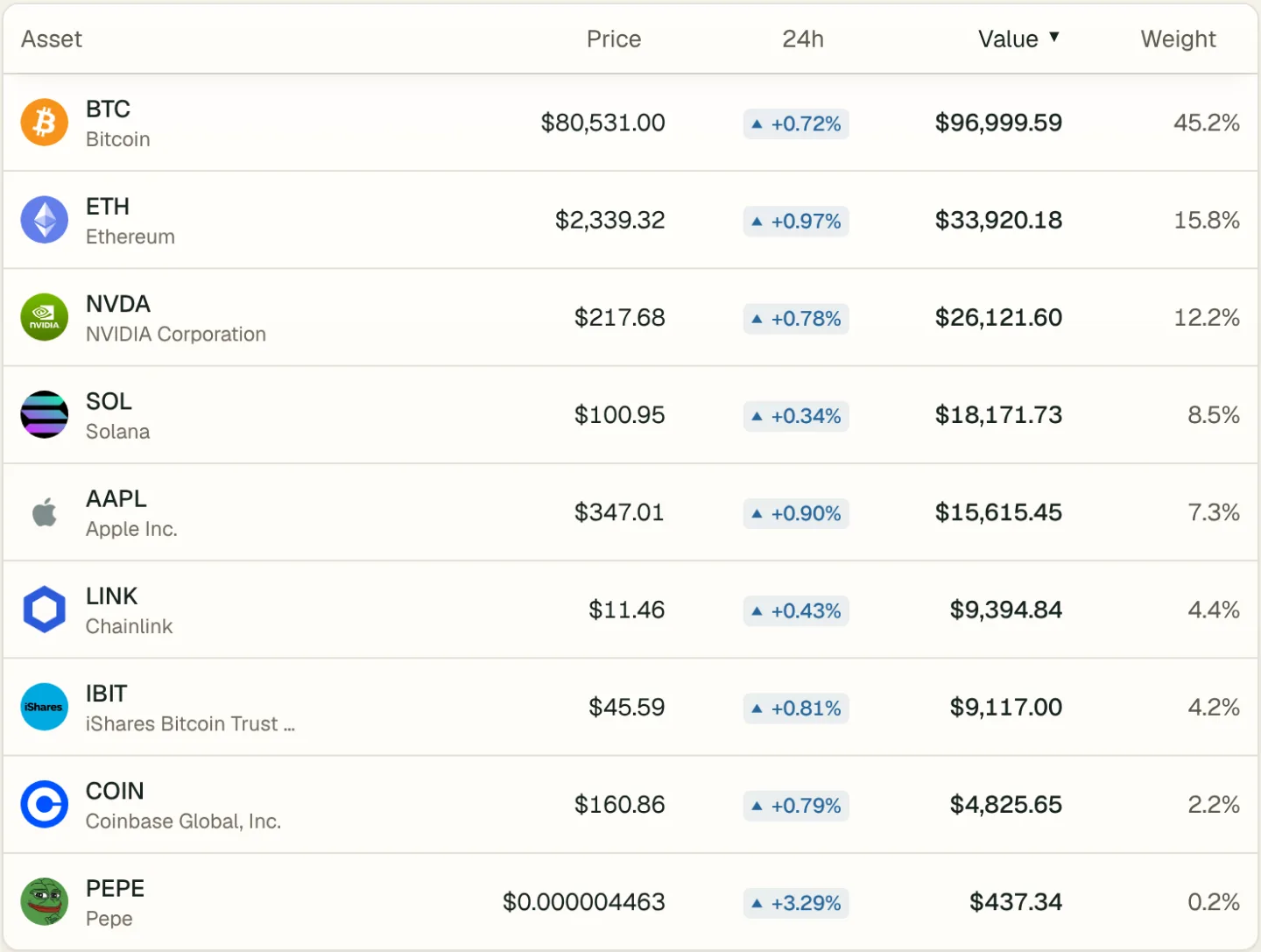
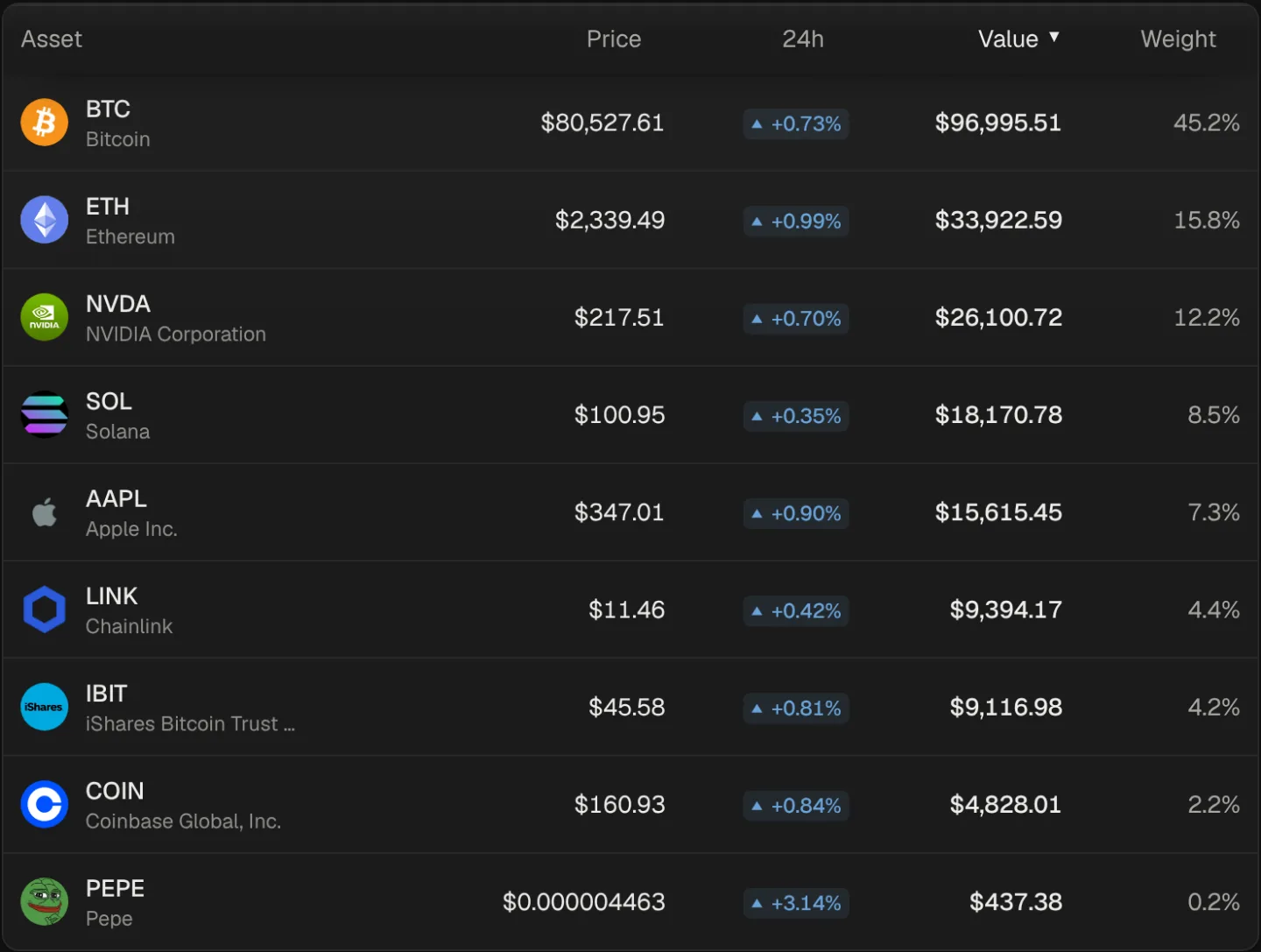
Wallets, exchanges, brokerage accounts and hand-entered positions in one list, valued together, so the split between stocks and crypto is a number instead of a guess.
Updated October 27, 2026
Most trackers are built for one side. Crypto apps read wallets and exchanges but treat stocks as an afterthought; stock apps follow brokerages and ignore the coins. If you hold both, you end up adding two totals in your head. Sonar was built for both from the start: one portfolio, one net worth, one performance line.
Everything you can bring in
| Source | How it connects | Plan |
|---|---|---|
| Wallets on more than 50 networks, including Ethereum, Solana, Bitcoin, XRP Ledger and Cardano | Public address or ENS name | Every plan |
| US brokerage accounts and crypto exchanges | Plaid, signed in on the institution's screens | Starter, Standard and Premium |
| Any broker, exchange or tracker export | CSV upload or pasted rows | Every plan |
| Anything else | Added by hand | Every plan |
Free includes one connected wallet, Starter three accounts, Standard five and Premium ten, brokerages and exchanges included; CSV imports and positions added by hand don't count toward that. Details by source: crypto wallet tracker, Coinbase, Kraken, brokerage accounts and CSV import.
What you see across both
Net worth and performance
One total for stocks, ETFs, funds, coins and brokerage cash, with the change over the last hour, day, week, month, year or all time. Performance is time-weighted, so deposits and withdrawals don't count as gains or losses. Compare your line with the S&P 500 (SPY) and Bitcoin on the same chart, which is a useful pair when your money sits in both markets.
Allocation by class
Allocation is shown by holding, by account and by class: crypto, stocks, funds, cash. Click an account to see only what's in it, or filter the holdings list to any combination of accounts, such as your brokerage and your Ledger.
One holdings list
Every position carries its price, 24-hour change, value, profit or loss and weight, whatever it is and wherever it's held. Each one also has its own page with a price chart, your position over time and its transactions.
Two market clocks
Crypto trades around the clock and stocks don't. Coin prices refresh through the day and night; stock prices follow the US trading session. When a price is late or missing, Sonar says so instead of showing it as current.
Market context for both
- Social data (Starter) for every stock and coin you hold: mentions, engagement, sentiment, social dominance, top creators, top posts and a week of news.
- Onchain data (Standard) for the coins you hold: holders, supply concentration, network activity and large transfers. It applies to coins only, since stocks don't live on a chain.
- AI alerts (Standard) when something unusual happens to anything you hold, plus custom alerts (Starter) at the levels you set.
All of it covers only assets you hold, so it stays about your money.
Want to see it before connecting anything? Open the sample portfolio.
Ask an AI assistant about all of it
Connect Sonar to Claude, ChatGPT or Cursor through its MCP connector, and the assistant can read your whole picture when you ask:
What's my allocation between stocks and crypto, and how has it shifted this month?
Compare how my brokerage account and my crypto accounts did this week.
On Standard the assistant reads holdings, P&L and allocation; on Starter, market and social data for what you hold. It can't trade or move funds. See the AI portfolio tracker page and Developers.
Read-only everywhere
Wallets are read by public address. Brokerages and crypto exchanges connect through Plaid for investment data only, your password for them never reaches Sonar, and Sonar never asks for exchange API keys. Credentials are encrypted, every portfolio is isolated at the database level, and nothing is sold. More on the security page.
Pricing in brief
- Free: portfolio, live prices, manual entry, CSV import, one connected wallet synced daily.
- Starter, $7 a month: three connected accounts synced every 6 hours, brokerages and exchanges through Plaid, social data, custom alerts, market data in AI tools.
- Standard, $11 a month: five connected accounts, AI alerts, onchain data, your full portfolio in AI tools.
- Premium, $20 a month: unlimited holdings, ten connected accounts, 2,000 API requests a day.
See pricing for yearly prices and API credits.
FAQ
Can I track stocks and crypto for free?
Yes. Free includes the whole portfolio with stocks and crypto together, live prices, manual entry, CSV import and one connected wallet.
Do I need to connect accounts?
No. You can add everything by hand or from a CSV. Connections keep balances current without retyping.
Is my brokerage supported?
Brokerage connections cover US institutions available through Plaid, on Starter, Standard and Premium. Any broker's positions export can be imported as a CSV on every plan.
Does Sonar give investment advice?
No. It shows what you own and what's happening to it. It never tells you to buy, sell or hold.
Related pages
- How to track crypto and stocks in one placeSee stocks, ETFs and crypto as one portfolio. List every account, pick how each one connects, and check that totals and history add up.
- How to track asset allocation across crypto and stocksMeasure how your money is split across stocks, ETFs, crypto and cash, spot concentration and drift, and keep an honest view of diversification.
- Investment portfolio tracker for stocks, ETFs and cryptoTrack every investment in one portfolio app. Stocks, ETFs, funds, crypto and cash from wallets, exchanges and brokerages, with returns, allocation and net worth.
- Delta alternative for crypto and stock portfoliosComparing Delta by eToro with Sonar: one portfolio for crypto, stocks and ETFs, social data on what you hold, read-only connections and AI access.
- Supported blockchains, brokerages and exchangesEvery network, institution and asset you can bring into one portfolio, listed A to Z.